Checking rates
To check shipping rates for a given destination, you can follow the instructions below to do so via the API or in Dashboard.
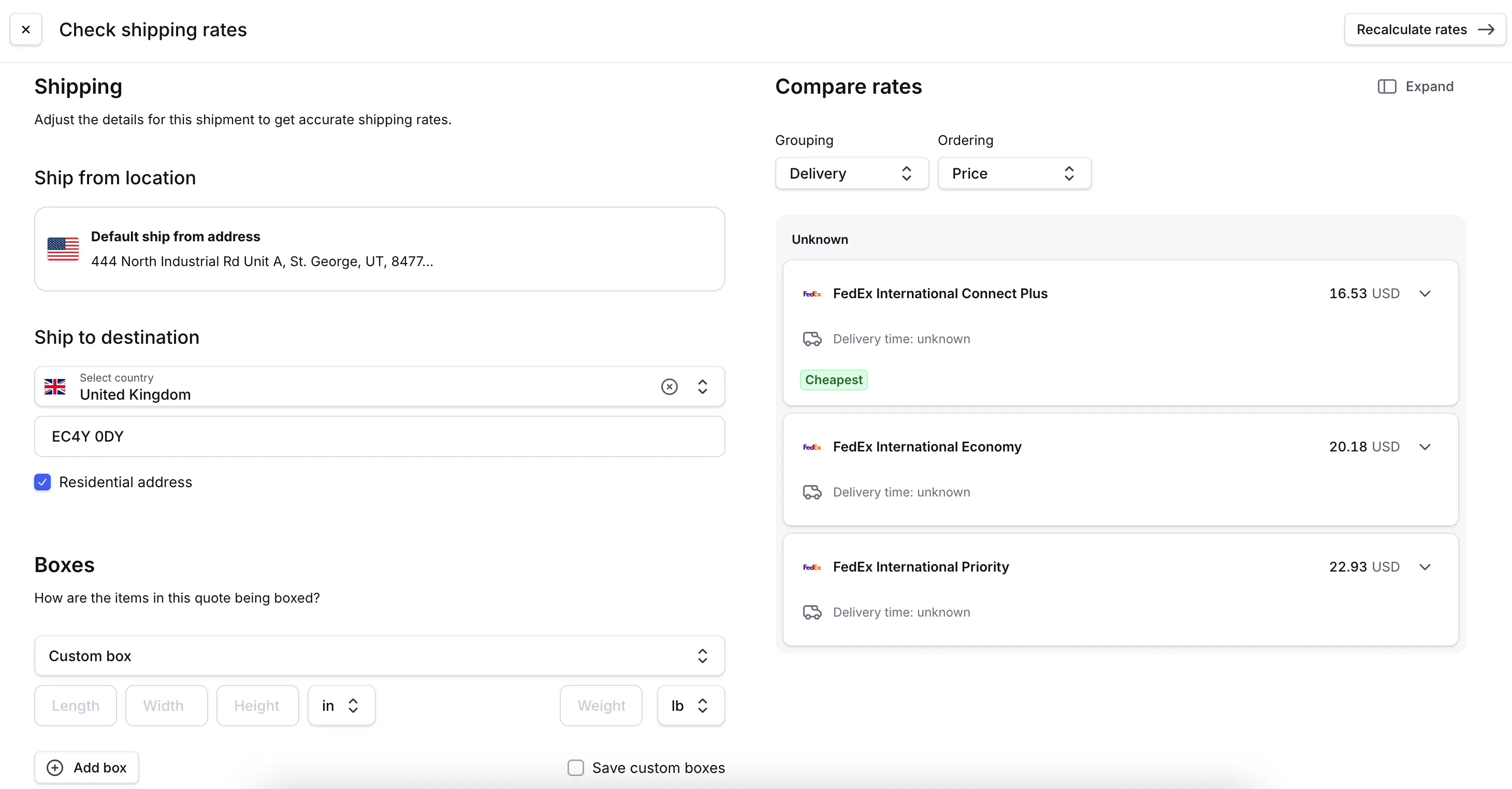
- Go to Dashboard -> Shipping -> Rates.
- Click Check rates.
- Select the Ship from location.
- Select the country you are wanting to get rates for and fill in all details.
- Enter the carton dimensions and weight.
- Click Calculate rates.
Instant Rate (Beta)
Instant Rate uses your shipping history to predict shipping costs instantly. When you request shipping rates using shipmentRatingCalculateWorkflow, we first check if an instant rate is available based on cached carrier data. If so, you'll receive it immediately—typically 1 second faster than live carrier rates. If not, we request fresh rates from the carrier and cache them using AI to improve future predictions.
Benefits:
- Faster response times: Instant rates return without waiting for carrier API responses (approximately 1 second faster)
- Improved reliability: Reduces dependency on carrier API availability and performance
- Consistent checkout experience: Customers receive reliable shipping costs quickly and consistently
Rate accuracy
Instant rates are predictions that may occasionally differ from live carrier rates by a few cents. Common reasons for variations include:
- Fees that vary by timing (e.g., Saturday pickup fees)
- Recently changed carrier discount rates
- Uncommon surcharges we're still learning to predict
- Time-sensitive carrier pricing adjustments
If your shipments commonly involve these scenarios, you may prefer live carrier rating. You can disable Instant Rate anytime in Dashboard settings (coming) or by contacting Zonos Support.
Instant rates reflect your actual negotiated carrier rates, including discounts, fuel surcharges, and applicable fees. When we request fresh rates, we use them to continuously improve prediction accuracy.
Setup
Supported carriers: APC, DHL, FedEx, UPS, and USPS (single-package shipments only)
DHL Express 12pm is supported but less accurate than other services.
Instant Rate is currently opt-in beta. To enable it, contact Zonos Support or toggle it on in Dashboard settings (coming soon).
Once enabled, Instant Rate works automatically with no integration changes required. API users will see a SOURCE field in the response indicating whether the rate is LIVE or CACHE (Instant Rate).
Example:
Mutation
GraphQL
mutation GetFullLandedCost($partyCreateWorkflowInput: [PartyCreateWorkflowInput!]!, $itemCreateWorkflowInput: [ItemCreateWorkflowInput!]!) {
  partyCreateWorkflow(input: $partyCreateWorkflowInput) {
    id
  }
  itemCreateWorkflow(input: $itemCreateWorkflowInput) {
    id
    catalogItem {
      id
    }
    amount
    amountInclusive
    name
    reverseAmountDetail {
      type
      feeAmount
      dutyRate
      taxRate
      inclusivePriceConfigurationId
    }
    currencyCode
    hsCode
    hsCodeSource
    name
  }
  cartonizeWorkflow {
    id
  }
  shipmentRatingCalculateWorkflow {
    id
    serviceLevelCode
    source
  }
}
Inputs
{
  "itemCreateWorkflowInput": [
    {
      "amount": 95.23,
      "currencyCode": "CAD",
      "productId": "1231",
      "sku": "142",
      "name":"hat",
      "quantity": 3,
      "description": "hair brush",
      "hsCode": "6505.00",
      "measurements": [
        {
          "type": "WEIGHT",
          "value": "1",
          "unitOfMeasure": "POUND"
        },
        {
          "type": "LENGTH",
          "value": "8",
          "unitOfMeasure": "INCH"
        },
        {
          "type": "WIDTH",
          "value": "6",
          "unitOfMeasure": "INCH"
        },
        {
          "type": "HEIGHT",
          "value": "4",
          "unitOfMeasure": "INCH"
        }
      ]
    }
  ],
  "partyCreateWorkflowInput": [
    {
      "type": "DESTINATION",
      "person": {
        "firstName": "TestFirstName",
        "lastName": "TestLastName",
        "companyName": "Test"
      },
      "location": {
        "line1": "389 5th Street North",
        "locality": "Sainte-Adèle",
        "postalCode": "J8B7E4",
        "administrativeArea": "QC",
        "administrativeAreaCode": "QC",
        "countryCode": "CA"
      }
    },
    {
      "type": "ORIGIN",
      "person": {
        "firstName": "test",
        "lastName": "person",
        "companyName": "recipient corp",
        "phone": "1234567890",
        "email": "test@email.com"
      },
      "location": {
        "line1": "967 Tech Ridge Dr",
        "locality": "Saint George",
        "administrativeAreaCode": "UT",
        "postalCode": "84770",
        "countryCode": "US"
      }
    }
  ]
}
Response
JSON
{
  "data": {
    "partyCreateWorkflow": [
      {
        "id": "party_0nh31km10ys7v"
      },
      {
        "id": "party_0nh3192zrys74"
      }
    ],
    "itemCreateWorkflow": [
      {
        "id": "item_0nmjm06pn4sbp",
        "catalogItem": null,
        "amount": 95.23,
        "amountInclusive": null,
        "name": "hat",
        "reverseAmountDetail": null,
        "currencyCode": "CAD",
        "hsCode": "6505.00.4000",
        "hsCodeSource": "TARIFF_COMPLETED"
      }
    ],
    "cartonizeWorkflow": [
      {
        "id": "carton_0nmjm06vzq178"
      }
    ],
    "shipmentRatingCalculateWorkflow": [
      {
        "id": "shipment_rating_0nmjm09k0xhbz",
        "serviceLevelCode": "dhl.express_easy",
        "source": "CACHE",
        "amount": 192.79,
        "currencyCode": "USD"
      },
      {
        "id": "shipment_rating_0nmjm09kcxhbn",
        "serviceLevelCode": "dhl.express_worldwide",
        "source": "CACHE",
        "amount": 27.83,
        "currencyCode": "USD"
      }
    ]
  }
}
FAQs
Will this change my shipping costs?
No. Instant rates are based on your actual negotiated carrier rates. They may occasionally differ from live quotes by a few cents as the AI continues learning.
What happens if my carrier rates change?
We automatically request fresh rates from the carrier and update the instant rate model.
Do custom shipping rules still apply?
Yes. Custom rules like shipper buffers work normally with Instant Rate.
Shipping rates
Get live shipping rates with Zonos Rate.Zonos Rate allows you to check shipping rates to and from any destination your carrier accounts are authorized for. We use API connections with carriers or provided rate sheets to retrieve this information. The shipment options returned in the calculated shipping response correlate with the
serviceLevelsyou've assigned to shipping profiles in Dashboard. If you expect aserviceLevelin the response but don't see it, ensure thatserviceLevelis enabled for the destination.